6.16.2009

A Closer Look at the E-P1

loupe.jpg

The excitement from the Olympus PEN E-P1 launch is starting to die down, and people are deciding weather or not they actually want the camera. Most of the specs look great, but let's take a closer look. Sure, I haven't used the camera yet, but that never stops some camera pundits (rhymes with Schlockwell) from making 'reviews'. Basically, I'm going to step through what we know about the camera to help myself (and maybe you) decide about pre-ordering it.

The LCD

Like it or not, the primary method of interacting with this camera will be the LCD screen. The optical viewfinder for the 17mm lens is a great idea, but it only works with one lens and doesn't let you know what the camera is focusing on. You'll still need to use the LCD to review your photos, use many of the camera's features (in-camera RAW development, etc.) and change your settings. This is why it's so baffling that Olympus chose to use a behind-the-times 230k-pixel 3-inch screen while the competition's screens have AT LEAST twice the resolution. The only reasons I can think of are cost-cutting or battery life. If it's the former, the center of the camera's interface a terrible place to skimp. If the latter, I can't imagine it saves too much power, since the back-light (which is the main power draw) would still be the same size.

Now the LCDs in Oly's DSLR offerings are pretty good as low-pixel-count ones go, so this LCD should still be better than the appalling one found in the DP2 (which has the same pixel count). I recently used a 230k-pixel SD880IS alongside a 5D Mark II , which has quadruple the resolution on the same size screen, for a prolonged period of time. While the 5D2's screen is incredibly good, I rarely found the quality 230k-pixel LCD of the SD880 lacking. Initial reports say that the screen is excellent for it's resolution, but viewability (and manual focusing) become very difficult in bright sunlight. Thus, the E-P1's LCD choice is unfortunate here, but I don't think it'll be a deal-breaker.

Performance

If the E-P1 is to be the DMD (decisive moment digital) of Mr. Johnston's dreams, it will have to very snappy in operation. I'm not worried about shutter lag, since all the previews say that it's mostly non-existent. Power-up and shut-down times seem good as well. 3fps and a big RAW buffer are also very nice. Since the processor in the camera is very similar to the ones in the latest Olympus DSLRs, we can assume that general camera performance, SD write speeds, etc. will also be very good.

The biggest concern here is the autofocus system. Let's see what initial previewers have had to say:

My time with the camera was too limited to say anything concrete about the autofocus system, except that it was not obviously slow in any way. More testing definitely needed there.
- Eamon Hickey on T.O.P.

The E-P1 uses essentially the same focus system as cameras such as the E-620, meaning that it feels sluggish even compared to most compacts (that said, we're playing with a very early IP (initial production) unit here - without the final firmware - so will reserve judgment until we've got the finished product).
- DPReview's Preview

The live view experience is better than on most digital SLRs, but not as good as I've seen. The camera uses the Live MOS sensor to focus (using contrast detection), and it's faster than on Olympus' D-SLRs, but the Panasonic G-series twins and the Sony A3xx series are all noticeably faster.
- DC Resource's Preview

I can attest to the fact that the Panasonic G1 's AF speeds are excellent. Not nearly as fast as, say, and EF 85/1.8 on a Canon 50D , but certainly good enough for the vast majority of uses. Panasonic has not passed on the secret of super-fast contrast-detect AF to Olympus, and this might be a killer. Slow autofocus (among other things) is what killed the Sigma DP2 for so many people. From the comments above, the E-P1 will lie somewhere between the DP2 and the G1. That may or may not be good enough. It's important to note that firmware 1.0 (the one at least some previewers used) will not be the final production firmware version. We can only hope that they can considerably speed up AF before release. One silver lining is that contrast-detect AF can be used as AF-confirmation when using manual-focus lenses.

The m43 Lenses

ep1M-ZUIKO-DIGITAL-17mm.jpg

The 17mm f/2.8 pancake. This is the lens many have been waiting for. A nice 35mm (-ish) FOV and a fast (-ish) lens in a very small package. Many rangefinder people have been excited about the combination of this lens and the optical viewfinder . Unfortunately, the lens isn't all it's cracked up to be. Take a look at these samples from DPReview taken with the 17/2.8. Note the massive amount of chromatic abberation in the first photo, which is stopped down to f/6.3. The short lens-to-sensor distance, which typically requires light to hit the sensor at more of an angle, may be the culprit here. More telecentric designs like those found in the DP2 and most 4/3 lenses tend to have less CAs. None of the 17/2.8 samples I've found are taken with an aperture wider than 6.3. Update: there are now a couple shots at f/2.8: This one and this other one. The lens seems reasonably sharp at F/2.8 and very sharp by f/6.3. If a lens is going to be my main walkaround prime, it has to be exceptional, not just pretty good. The latest f/2.8 samples do seem to suffer from less CAs than some of the other samples I've seen, even in the first shot (backlit headshot). There are very few primes for the 4/3 system, and only this one (so far) for m43. The other 4/3 primes, especially the Olympus 50mm f/2.0 Macro macro and the expensive Panasonic 25mm f/1.4 have excellent reputations, but it seems like the 17/2.8 is not quite there.

olympus-e-p1-compact-lg1.jpg

The all-important kit lens, the 14-42mm f/3.5-5.6 . On paper this is very similar to the G1's kit (very good) kit lens. The coolest feature of this lens is its ability to collapse down much smaller than at its shortest focal length. This allows the kit to stay much thinner than the competition. It is still somewhat wider around than the pancake, but impressively compact for a kit lens. The samples from this lens also show far less chromatic abberations than those taken with the 17/2.8. The build quality will likely be like that of other cheap Olympus kit lenses, but that is still better build and image quality than most $100 kit lenses on the market.

Panasonic also has 4 m43 lenses of their own that are all compatable with the E-P1. The ultrawide 7-14mm f/4.0 , the G1 kit 14-45/3.5-5.6, the telephoto 45-200/4.5-5.6, and the GH1's 14-140 "HD" lens. All of the current Panasonic m43 lenses other than the ultrawide offer optical image stabilization, but that apparently won't work on the E-P1, which has its own stabilization system. Initial reports on the 14-140 say it's not so great for stills, which isn't surprising given the 10x zoom ratio and the fact that it's focused on videos. Either way, the 14-140 would look very large and unweildy on an E-P1. The 14-45 kit seems redundant given Oly's very similar and smaller kit lens. The telephoto and ultrawide lenses could be interesting options for E-P1 users. They are still large, but offer fields of view not yet available from Olympus... at least not in native m43 mount. As with any new system, lens choices for m43 are currently somewhat limited, especially as far as fast prime lenses are concerned. Enter the adapters...

"Alternative" Glass

Since the flange-to-sensor distance of m43 is so much less than other interchangeable-lens systems, almost any lens can be adapted to m43 cameras. There are official and 3rd party adapters covering Four Thirds , Olympus OM , and Leica M, Leica R, Canon FD, and more. Much has been written about using adapted lenses (mostly M-mount as they are smaller than SLR lenses) on the G1. I'd love to try the ZM 35/2, FD 24/2, or even an LTM Jupiter-9 85/2 on the E-P1. Many who have tried it ended up sticking with the kit lens as they didn't like the hassle of stopping down manually, etc, but I think it would be interesting for a while at least. There are, however two HUGE problems with adapted glass on the E-P1.

First and most obviously is the smaller sensor on the m43 cameras. You get an effective field-of-view of a lens with 2x the focal length. Since most adapted lenses will be designed for 35mm film, this will make it difficult to cover the wider end of FoV range. That 35/2 becomes a 70/2, and even an "ultrawide" 15/4.5 becomes a 30/4.5. The flip side of this is that a) you only use the center (usually best) part of the image circle, and b) you can get compact long lenses. A 50/1.4 becomes a 100/1.4 portrait lens with in-body IS and more depth-of-field (given the same framing) than a 100/1.4 on 35mm.

The other problem with manual-focus lenses on the E-P1 is the act of focusing. Since the E-P1 has no viewfinder, you have to hold it out in front of you to see the screen. I have tried manually focusing MF lenses using live-view at arm's length on the 40D and the 5D markII, and it is not fun. It works well enough if you have plenty of time to set up your shot, but otherwise it's clunky. The low-res screen of the E-P1 doesn't help either. The G1's eye-level viewfinder would probably be better for adapted lenses, but Panasonic's cameras don't offer in-body IS and probably won't anytime soon. Fortunately, the E-P1 does offer a feature that zooms in the LCD while you're focusing your MF lenses. Update: It turns out that the auto-zoom feature in MF or MF+AF mode only works with lenses that can tell the camera the focus ring is being turned. That means you only get the auto-zoom feature with 4/3 or m43 lenses. You can still magnify the view, but you'll have to flip in/out of the magnified view manually (zoom, focus, un-zoom, compose, shoot).

Neither of these disadvantages apply to (Olympus branded at least) 4/3 lenses, which will all eventually have their firmwares updated to AF with the E-P1.

Image Quality

Putting this section near the end of the article may make it seem like I don't care about IQ, but the fact is we basically already know what kind of images we can expect from this camera. The same 12mp sensor has already been reviewed in several cameras (Panasonic G1, Olympus E-620, Olympus E-30) and has proven itself to be a solid performer. 4/3 and now micro 4/3 (m43) have always lagged about 1 stop behind the APS-C crowd in terms of noise control, but new noise-reduction algorithms make ISO1600 seem pretty useable on these latest cameras. Even the ISO6400 shot I saw looked decent, mainly due to the good control of chroma noise. Olympus has a reputation for excellent image processing, and the E-P1 is supposed to have a weaker anti-aliasing filter than the Oly DSLRs (due to the new, more powerful, image processor being able to get rid of moire). The camera will be correcting distortion, but it remains to be seen if it is done in the RAW files or not. Hopefully it will not happen until you process the files. My main concern is some serious shadow noise in the samples, even at base ISO (200), but it may be due to some post-processing issues. I'm not expecting 5DmarkII quality, but it will still be miles ahead of any small-sensored camera.

Design

olympus-e-p1-compact-lg.jpg

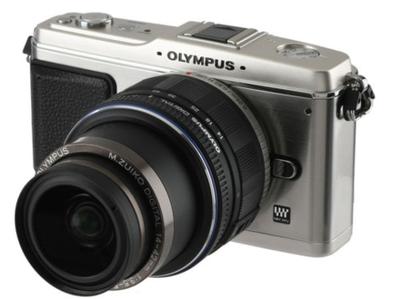
The aluminum (top / bottom) and stainless steel (sides) camera comes in white / beige or...
olympus-ep1.jpg

silver / black. Even with the odd-looking extended kit zoom, the camera is very handsome. Olympus is clearly trying to appeal to "step-up" users that I mentioned in my G1 post. Many of the people who don't want the bulk of DSLRs are women, so the more "feminine" looks of the white model were a smart (and nice-looking) move. It's interesting that the E-P1 weighs more than the considerably larger Panasonic G1. This is probably due to the metal build. It is still, however, a decidedly lightweight camera.
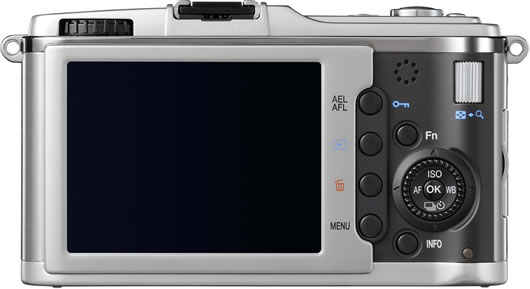
ep1back.jpg

This is evidenced by the familiar P&S-like controls on the rear of the camera. All-in-all, the design seems very well laid out. I'd prefer a 1-front / 1-rear dial configuration to two rear ones, but that's probably nitpicking. Many people are disappointed that there's no black-on-black option. I personally don't care too much, but it would be nice to have I suppose.

The only problem I can see with grip-less cameras is that even a pancake lens sticks out at least 1cm, so the thickness of the camera with a lens is never any less than the thickness at the mount + 1cm. This means that the grip area could always be a little thicker, which would accommodate a larger and longer-lasting battery.

Buy now, or wait?

If you've made it through this post still wanting this camera, there's one more issue to think about: more interchangeable lens digital (ILD) cameras set to release sometime in 2009. I say ILD instead of m43 because another similar system is supposed to be coming from Samsung (the NX system).

The Samsung NX system will use larger APS-C sensors with a 1.5x crop factor, so that system might be better for those who mainly want to use adapted lenses. However, the bigger sensor necessitates bigger bodies and bigger lenses, so you aren't likely to see an NX camera the size of the Pen.

Panasonic has announced that their long-awaited and much-hyped 20mm/1.7 will be available this Fall. There will probably also be a smaller Panasonic m43 camera on the way. The word is they started with more conservative DSLR-like design with the intention of getting more Pen-like in the future. The G1 is also a very viable competitor. It's considerably larger than the E-P1, but still a very compact and comfortable camera and very affordable. It would be a good choice for those who insist on an EVF or who like high-res articulating LCDs (which are great).

Olympus itself plans to release an m43 camera with an EVF:

We are now preparing for a future product with an EVF. But for this product [E-P1] we were concentrating on small size.
- Akira Watanabe, from a DPReview interview.

The quote does, however, imply that the EVF-equipped Olympus would be considerably larger than the E-P1. It almost seems like the E-P1 and G1 would compliment one another perfectly.

So, what'll it be?

Well, the E-P1 looks like a great camera with a couple of flaws. Namely: the low-res LCD and the sub-Panasonic focusing speeds. I almost kept the DP2 with it's WAY worse LCD and WAY slower focusing, and the E-P1 is only $150 more than the DP2. I think the E-P1 is a "buy" for me, so the real question is which kit to get:

I have some doubts about the quality of the 17mm prime, and f/2.8 isn't really fast enough for me. I'd also like to avoid paying $100 for a viewfinder which will make the camera larger and which I probably wouldn't use all that often. It's too bad that the lenses are $50 when bought with the camera yet $230 when bought alone. I think the 14-42 kit is the best option for now. Hopefully the Panasonic 20mm f/1.7 will be good enough to be my fast prime for this lens. Now to find a good M-mount to m43 adapter...

A Few Links:

The Pen Is Mightier

ep1front.jpg

Gussy it up however you want, Trebek. What matters is: does it work?

Olympus has mastered the art of the increasingly popular slow leak with the announcement of the new Pen E-P1. Pentax tried to make the "leaked" photos of their new K-7 more illicit-looking, but the build-up and pay-off of the E-P1 announcement has been incredible. The long and frenzied threads over at RangeFinderForum and the Fred Miranda Forums are your evidence.

I've ordered a product like this before (Sigma DP2). Wasted a pretty penny I don't mind telling you and if the Pen's iS (image stabilization) really works, I'll order a dozen.

The M43 Playing Field (with some competition):

Now that we have official specs, we can proceed with the inevitable comparisons with Panasonic's G1 and GH1. I've thrown in the Canon T1i and Pentax K-7 as well, since they represent different levels of the compact DSLR. The DP2 is in there to feel some shame.

Olympus E-P1 Panasonic G1 Panasonic GH1 Sigma DP2 Canon T1i (500D) Pentax K-7
Price

$800 with 14-42/3.5-5.6 lens (28-84mm EFoV) $900 with 17/2.8 pancake lens (34mm EFoV)

$700 (black) or $640 (blue or red) with 14-45/3.5-5.6 OIS lens (28-90mm EFoV) $1,500 with 14-140/4.0-5.8 OIS HD lens (28-280mm EFoV) $650 with fixed 24/2.8 lens (41mm EFoV) $850 with 18-55/3.5-5.6 IS lens (29-88mm EFoV) $1400 (est.) with 18-55/3.5-3.6 WR lens (27-83mm EFV)
Size 121x70x36 mm + considerably thinner than and approx 2/3 the volume of G1/GH1 124x84x45 mm 124x90x45 mm 113x60x56 mm (inc. lens) 129x98x62 mm 131x97x73 mm
Weight 410g body inc. battery 360g body inc. battery 385g body only (?) 280g body inc. battery and lens 520g body inc. battery 754g body inc. battery
Sensor 12.3mp (13.1 actual) 4/3" w/ 2x crop factor 12.1mp (13.1 actual) 4/3" w/ 2x crop factor 12.1mp (14.1mp actual) 4/3" w/ 2x crop factor + true multi-aspect sensor APS-C w/ 1.7x crop factor 15.1mp (15.5mp actual) APS-C w/ 1.6x crop factor 14.6mp (15.1mp actual) APS-C w/ 1.5x crop factor
Video 720p @ 30fps MJPEG (weak compression) None

1080p and 720p @ 30fps AVCHD or MJPEG

320x240 only 1080p @ 20fps 720p @ 30fps 720p (or 1080i) MJPEG (weak compression)
Stabilization In-body - not active during filming + works with all lenses In-lens + active during filming - each lens needs OIS In-lens + active during filming - each lens needs OIS None In-lens + active during filming - each lens needs IS In-body - not active during filming + works with all lenses
LCD Screen 3 inch - non-articulating - 230,000 dots

3 inch + tilt and swivel + 460,000 dots

3 inch + tilt and swivel + 460,000 dots

2.6 inch - non articulating - 230,000 dots - terrible

3 inch - non-articulating + 920,000 dots 3 inch - non-articulating + 920,000 dots
Viewfinder None (optional hotshoe finder w/ 17mm lens) Excellent EVF 100% coverage Excellent EVF 100% coverage None (optional hotshoe finder) Optical TTL 95% coverage Optical TTL 100% coverage
Built-In Flash? No Yes Yes

Yes (but very slow and weak)

Yes Yes
AF Assist Only w/ add-on Olympus flash units Built-in dedicated lamp (not flash strobes like many DSLRS) Built-in dedicated lamp (not flash strobes like many DSLRS) None (!) Yes, but uses annoying flash strobes. Built-in dedicated lamp (not flash strobes like many DSLRS)

EFoV is short for "equivalent field-of-view". Simply saying 'equivalent' is a bit misleading.

5.08.2009

Know Your Users - Micro Four-Thirds

Mainstream camera companies are pushing entry-level DSLRs "average consumer" as the answer to the mediocre image quality they get with the tiny sensors in their compacts. There's no doubt that these T1is, D5000s, etc. have great image quality, but are they really what these average consumers need?

Let me clarify what I mean by "average consumer". I'm not talking about enthusiasts who want a first DSLR. I'm talking about people, many with families, who want to capture their lives without becoming photographers. Sure, all DSLRs have "green modes" with auto-everything, but they're still essentially scaled back and less-good SLRs. These are great as entry points into vast systems or backups (or travel cameras) for those with higher-end cameras. My first DSLR was a Canon Rebel XTi, and it worked very well for what it was supposed to do.

The problem is that entry-level DSLRs are not necessarily the best tool for the aforementioned soccer-moms and hockey-dads. Let's start with the method of use itself. Many of these users are accustomed to shooting at arms length on their compacts. Optical viewfinders feel uncomfortable to them, and the ones in most entry-level DSLRs are extremely small. Lately, we've seen compact camera features like live-view in SLRs like the T1i and D5000, but these are tacked on and not particularly useful. Autofocus during live-view is either nonexistant or extremely slow, rendering the mode nearly useless for users who don't want to manually focus. Another SLR holdover is a preset number of focusing points. These users will rarely select focus points themselves, so why limit them to 7 or 9 points? Why not have a large-sensor version of AiAF that can analyse the whole scene and figure out what to focus on?

Clearly, some daring new ideas were needed. We're more likely to see daring designs from underdogs who have less to lose (and more to gain) by taking risks. Enter Panasonic and Olympus with Micro Four-Thirds. First out of the gate is the Panasonic Lumix DMC-G1. Now these consumer users can take pictures the way they're used to. A big screen, quick live-view focusing, a non-annoying AF-assist lamp, but with the same image quality as any entry-level DSLR. For up-to-the-eye shooting, the EVF is larger than the competing optical viewfinders. It even has overlays (rather than blinking focus points and symbols at the bottom) just like the rear LCD. The camera is even more compact than the competition and has the same kit lens choices (28-90 and 90-400 equivalents, both stabilized). Panasonic has finally succeeded where bridge point-and-shoots have failed repeatedly. Now we just need that 20/1.7 for indoor shots of the kids.

Of course I'm not the sort of user mentioned above and neither are most readers here, but the G1 also offers the full range of enthusiast features (RAW, configurability, P/S/A/M modes, etc.) as well. I'm still not sure if the DP2 is a keeper for me, but at the same price (a bit cheaper actually), the G1 is mighty tempting.

DP2 Samples Galore

Here's a roundup of other DP2 resources to keep you busy until part 2:
  • Carl Rytterfalk is a big Sigma guy and a very good photographer. He's not inaccurate, but he's careful not to focus too much on the negative points of any Sigma products. He's been posting tons of samples and other information on his blog.
  • PBase's DP2 group has full-sized shots from 10 photographers (including Carl) for you to view.
  • RFF user Yandiel has started posting samples from his DP2. He also uses an R-D1 and M8, so he'll have an interesting perspective on the camera. Go for the DP2 shots, stay for the great Parisian street shots.
  • sniki, another RFF user, has posted some samples in his flickr photostream.

5.07.2009

Sigma DP2 Review Part 1 - Interface and First Impressions

Today I received my Sigma DP2. This is the first in a multi-part review of the camera. Today I'll be focusing mainly on the interface and some initial thoughts. Be sure to subscribe to my blog to get the latest updates.

The Body

The camera is sturdy feeling and completely creak-free. Unfortunately, the buttons on the rear are still labeled with black indentations on black buttons. There are white labels next to the buttons for playback mode. This is contrary to the pre-production photos Sigma released which showed white labels for shooting mode and blue labels for playback mode. Honestly, this isn't a big deal, but it's a first sign of sloppy design from Sigma.


Black-on-Black Buttons... why?

The shutter feel is nice, but the rest of the buttons have a slightly cheap feel to them. They're a bit too springy and don't have the quality haptics of a Canon compact, for example. I guess this is common with compact cameras, but I expected a little better. The manual focus dial has just the right firmness and does not have the problem others have reported about the DP1 where the dial is easy to knock out of place.

The grip is pretty comfortable, although the camera's weight is mostly in the lens, so it will tend to lean a bit to the left. It isn't particularly front-heavy though. Ideally, Sigma would have made the battery larger (we'll see why later) and made the grip part a bit thicker. This wouldn't really add much bulk to the camera since the lens protrudes quite a ways.


The lens extends quite a bit when powered on.

The Interface

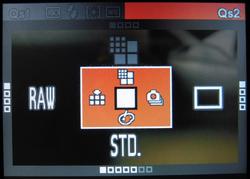
The new QuickSet button is a smart way to get access to all the important shooting options quickly. You hit the corresponding arrow key to cycle through the options for each setting.

Hit the button once and you get the following settings (QS1):

ISO
Auto
50
100
200
400
800
1600 (only w/ RAW)
3200 (only w/ RAW)
Flash Mode
Normal
Redeye
Slow Sync
Redeye + Slow Sync.
Metering Mode
Evaluative
Center Weighted Avg.
Spot
White Balance
Auto
Daylight
Shade
Overcast
Incandescent
Fluorescent
Flash
Custom

Hit it again for QS2:

Image Size (not available when shooting RAW)
Hi
Wide (16:9)
Med
Low
Image Quality
Fine
Normal
Basic
RAW
Drive Mode
Single Capture
Continuous
Self Timer 2 sec.
Self Timer 10 sec.
Color Mode
Standard
Vivid
Neutral
Portrait
Landscape
B&W (not available w/ RAW)
Sepia (not available w/ RAW)

It's nice of Sigma to protect us from poor JPEGs by not allowing us to use in-camera JPEG processing for ISOs 1600 and 3200. These are still created and embedded into the RAW files, but they are not usable. The results from SPP are far better. The fact that you can't shoot B&W or Sepia with RAW files is puzzling. The RAW files do include full-sized embedded JPEG previews, which is nice when browsing images with something like FastStone Image Viewer, which supports X3F files.

While custom WB mode can be selected through QuickSet, you must go through the main menu system to set the custom value. I would have appreciated a quicker way to set white-balance similar to the method used with the SD880 (one press of the print/share button), but it's not as big of a deal since most DP2 users will be shooting RAW.

There are a lot of other nice touches to the interface. The menu can be used in two ways. Closed mode is similar to most other cameras out there: You simply scroll through a list of settings and hit OK to expand and change that setting. Once you've opened up a setting, you switch to expanded mode instead of going to a seperate screen. In expanded mode, you use the 4 main directional keys to select the value and then hit OK to save it. The "zoom" up and down keys on the upper right of the camera back are used to scroll through the different settings. Hitting the display button (lower-right) gets you back to closed mode, which is quicker for scrolling through the list. This took me a little getting used to, but is quite nice.


Closed Mode


Expanded Mode

The menu in shooting mode contains less-used setup-related options like button bindings, bracketing order, auto-rotate, etc. These should really be in a sub-menu, but the cluttered menu is mitigated by the fact that all the important settings are available from the QuickSet system detailed above.

Speaking of setup-options. The DP2 is very configurable. You can set the function of the "zoom" buttons and the L and R arrow keys in each shooting mode (P, S, A, M). By default, the L and R arrows control exposure compensation while the zoom buttons control the main function of the mode you're in (program shift, shutter speed, or aperture). In manual mode, where there is no exposure compensation, the zoom keys control shutter speed while the arrows control aperture. The fact that this is configurable will useful to DSLR users, since competing brands have different ways of handling these controls. Canon SLRs are set up similarly to the DP2 defaults, with the arrow keys being analogous to the round quick-control dial on the SLRs.

You can also control the behavior of the AEL (auto exposure lock) button. By default it just does AEL, but I have it set to Center AF Lock. This can come in handy if you want to take several shots without refocusing. You can also set the button to do both AEL and AFL. You can also pick whether or not you want a half-press of the shutter to perform AE Lock.

Playback mode is also nicely configurable. There is an option to show overexposure warnings, and you can set the OK button to a shortcut. The button can be set to locking/unlocking, marking/unmarking, toggling the exposure warning, or rotating left or right. You can enter playback mode without extending the lens by simply holding the play button for a couple seconds. The camera does have an orientation sensor, which works nicely. Unfortunately you don't get to choose to assign the orientation to files only or to also show portrait-oriented shots sideways. Canon SLRs allow you to do this, which lets you fill the screen with portrait-oriented shots without ending up with unrotated images on your computer. It's a lot easier to turn a camera than it is to turn your monitor. Even most point-and-shoot cameras now make use of the orientation sensor in playback mode to show you the image properly no matter how you're holding the camera. The DP2 lacks this simple feature as well. The most onerous UI mistake on Sigma's part involves zooming in playback mode. A picture is worth a thousand words, so here are a couple thousand words to explain the issue:

View a photo taken in portrait orientation:

Now zoom in...

WHAT THE HELL!?! Why would you not use the rest of the screen? Someone at Sigma needs to get fired. This is fixable in firmware, but it's such a stupid issue that it just amazes me. Another thing you may have noticed about these images is that the LCD is quite ugly. It's decently visible outdoors, but the image quality and colors are poor in any light.

All-in-all, the controls are good for a compact, but they still mostly require looking at a screen and a bit of waiting. The DP2 doesn't have the immediacy of dedicated dials like an R-D1 or the lighting fast menu responses of the leading compacts. This camera makes you take your time, which isn't necessarily a bad thing, but is something you should be aware of.

First Impressions

These are just some random bullet points. Much more detail to come in the next parts of this review.

Good:

  • Extremely good per-pixel sharpness (no surprises there)
  • Almost no shutter lag once focused
  • Great configurability
  • Good control scheme for most things (QuickSet, etc.)

Bad:

  • LCD is pretty terrible. It's blown away by the SD880s screen.
  • AF is still quite slow. There should be an AiAF-type mode where you don't have to pick the point manually.
  • Low-light AF is weak. This camera REALLY needs an AF-assist lamp. What was Sigma thinking?
  • Some strange or outright wrong UI choices.

Quick Samples

Here are a few very quickly processed (with Sigma Photo Pro) sample shots. They're mostly devoid of photographic merit, but I was really just playing with the settings. Click for full-size versions with EXIF intact.


ISO 3200